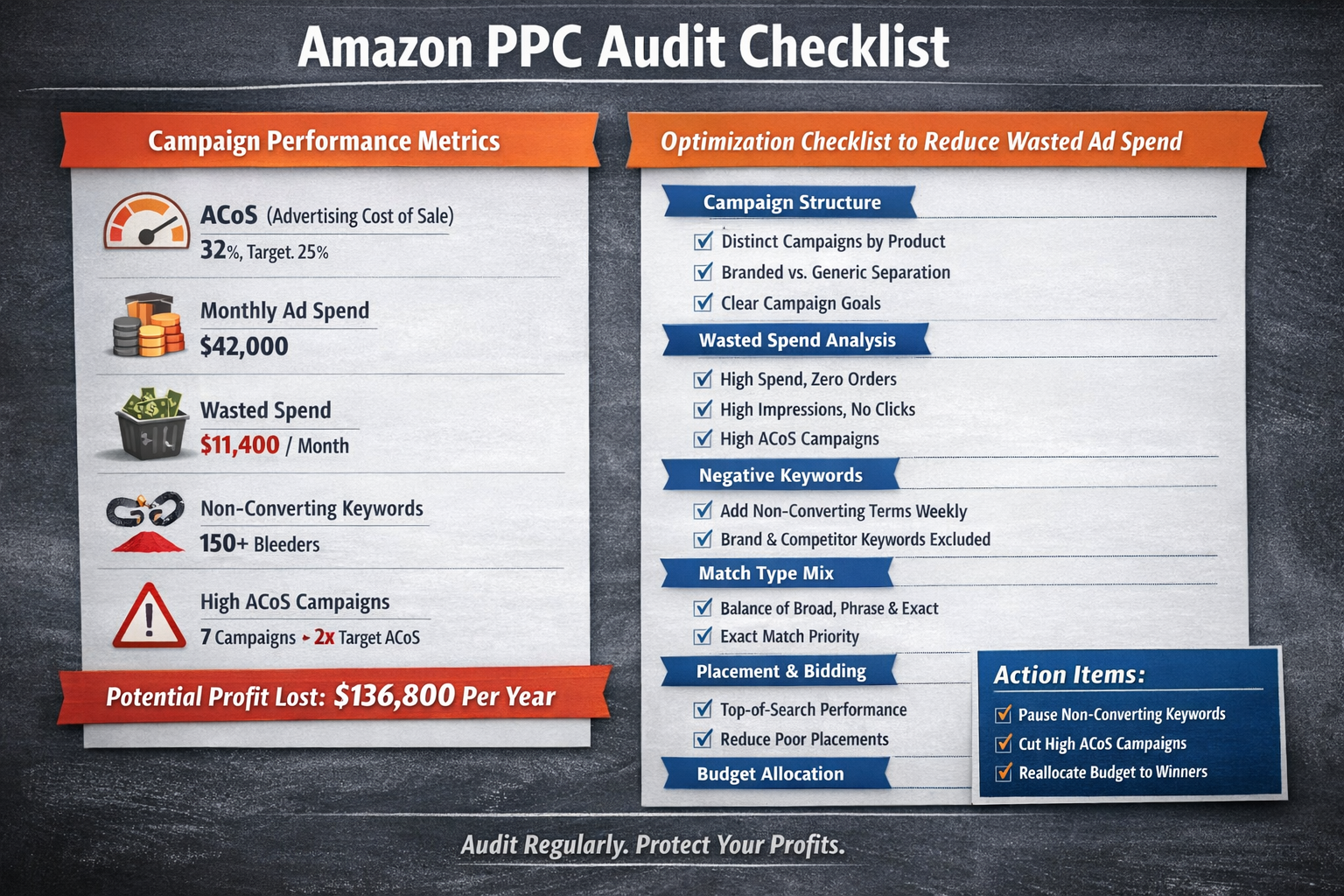
I ran an audit last week on a 7-figure account spending $42k/month on Amazon ads.
The owner thought everything was "fine." His agency sent pretty reports. ACoS looked reasonable.
Then I opened the search term report.
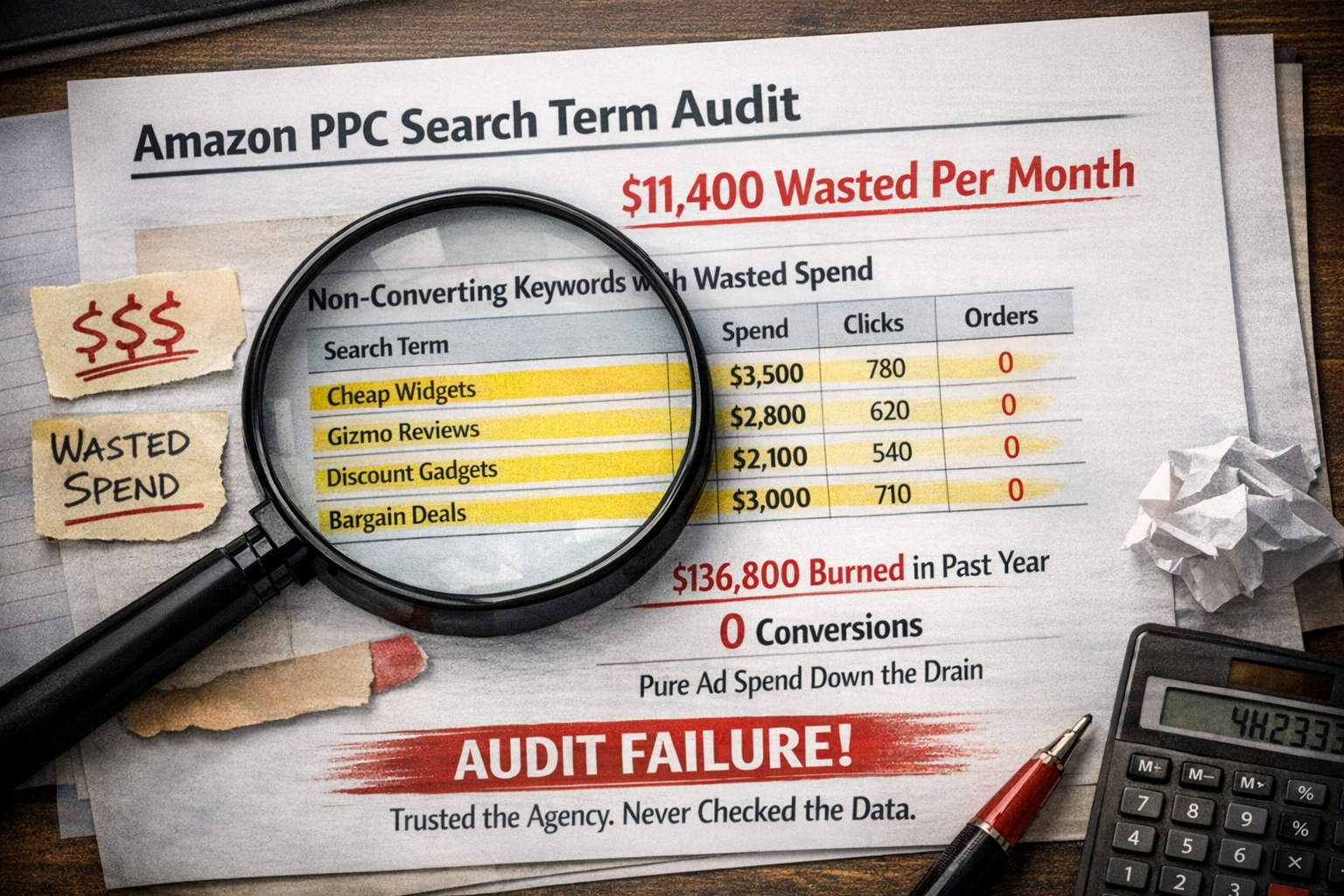
$11,400 in wasted spend. Every single month. On keywords that never converted. For over a year.
That's $136,800 burned. Gone. Poof.
Here's the thing—this seller wasn't dumb. He was busy building a brand, managing inventory, and planning an exit. He trusted his "experts" to handle the ads.
Nobody was auditing the account.
This is why audits matter. Not as a one-time thing—as a discipline. A system. Because without regular checks, even "good" campaigns develop leaks. Small inefficiencies compound into massive profit drains.
If you're spending $10k or more monthly on Amazon PPC, you need an audit framework. Not vague advice. A checklist you can run through systematically.
That's exactly what this is: twenty-seven specific checks across six categories, a scoring system to grade your account health, and action items for every red flag.
Ready to see how your account stacks up? Grab the free Wasted Ad Spend Calculator and follow along.
Why Regular Amazon PPC Audits Compound Your Profits
Most sellers treat audits like annual physicals—something you do once, feel good about, then forget.
That's backwards.
Here's the math: A 5% efficiency improvement each month compounds dramatically over a year. That's not theoretical—it's what happens when you systematically eliminate waste and reallocate to winners.
The sellers who build exit-ready businesses aren't the ones with the lowest ACoS. They're the ones with systems—repeatable processes that catch problems early and scale what works.
An audit isn't busy work. It's profit protection.
The 6-Category Amazon PPC Audit Framework
I've organized this checklist into six categories. Each addresses a different profit lever in your account.
Run through all 27 checks. Score yourself honestly. Then prioritize fixes based on impact.
Category 1: Campaign Structure (5 Checks)
Bad structure is the silent killer. It makes everything else harder—optimization, reporting, scaling. Get this wrong and you're fighting uphill forever.
Check #1: Distinct Campaigns by Product Type
Are your campaigns organized by product category, lifecycle stage, or strategic goal?
Mixing a new launch needing ranking with a mature SKU optimizing for profit? That's a recipe for confused bidding and blended data that tells you nothing.
Red flag: Multiple unrelated ASINs sharing campaigns with different margin profiles.
Check #2: Optimal Keyword Count Per Ad Group
More keywords isn't better. It's messier.
Best practice for most accounts: 5-20 keywords per ad group. Beyond that, you lose control over which search terms trigger which ads. That said, some high-volume categories can handle more—the key is whether you can still optimize effectively.
How to check: In Campaign Manager, click into any ad group and count active keywords. If you're scrolling endlessly, that's your answer.
Red flag: Ad groups with 50+ keywords fighting for the same budget with no clear performance segmentation.
Check #3: Proper Naming Conventions
Can you look at a campaign name and instantly know the product, match type, targeting strategy, and goal?
If your naming looks like "SP-Auto-Test-Final-v3-REAL," you've got problems.
Red flag: Inconsistent naming that requires opening each campaign to understand what it does.
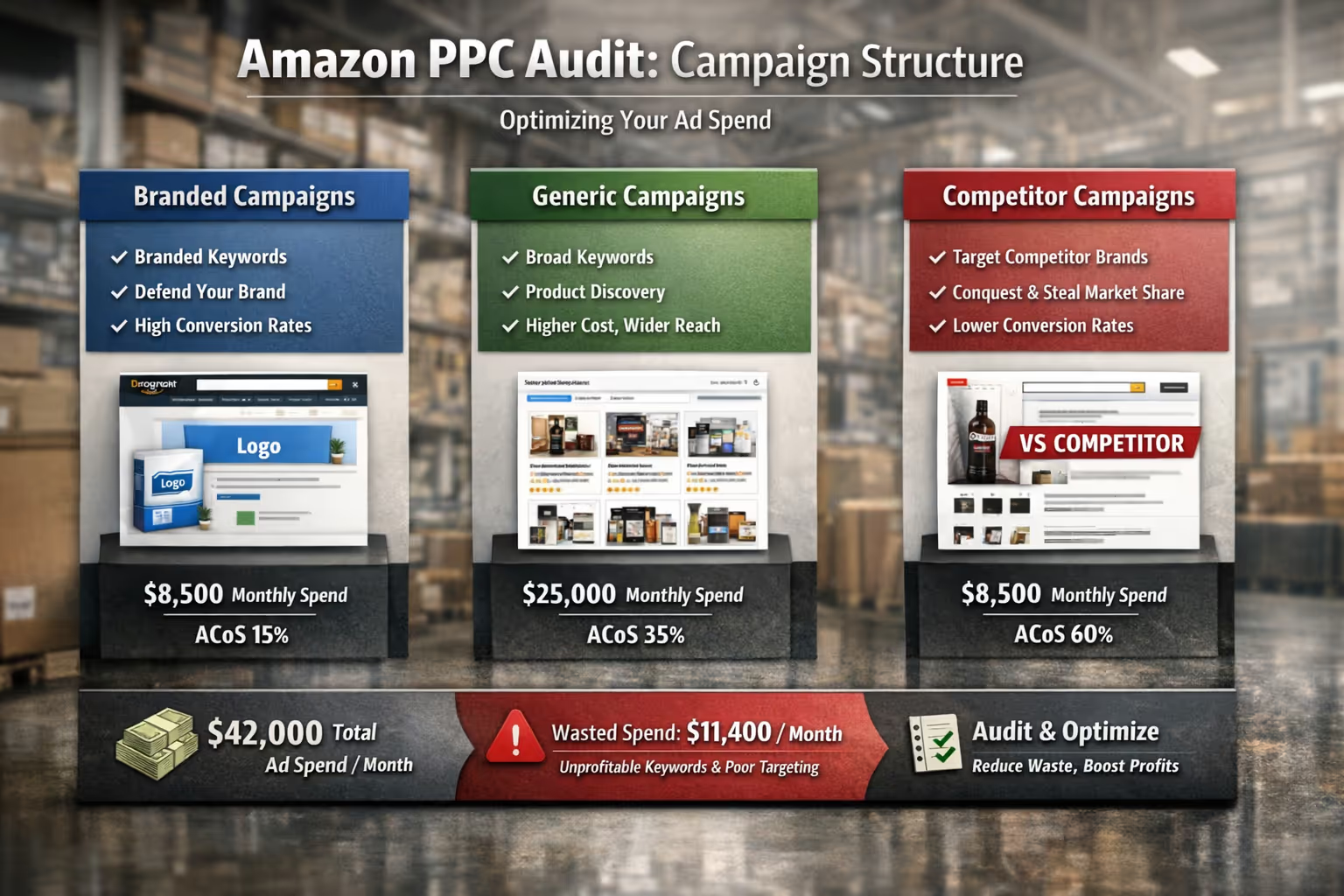
Check #4: Separation of Branded vs Generic vs Competitor Campaigns
These three targeting types have completely different economics.
Branded terms convert higher but cap your growth. Generic terms drive discovery but cost more. Competitor terms are strategic warfare with typically lower conversion rates.
Mixing them destroys your ability to optimize intelligently.
Red flag: Branded and generic keywords competing in the same campaign.
Check #5: Campaign Goals Clearly Defined
Every campaign should have one job: ranking, profit, or data collection.
Ranking campaigns bid aggressively on strategic terms. Profit campaigns protect margin. Data campaigns test new opportunities.
Trying to do all three in one campaign? You'll do none well.
Red flag: No clear documentation of what each campaign is designed to accomplish.
Category 2: Wasted Spend Analysis (5 Checks)
This is where the money hides. Or bleeds, depending on how you look at it.
I call these "bleeders"—search terms and keywords quietly draining budget while delivering nothing. The Cutting Bleeders SOP walks through the exact process I use.
Check #6: Search Terms with High Spend and Zero Orders
Pull your search term report for the last 60 days. Filter for terms with significant spend (I use 2x your target CPA as the threshold) and zero orders.
How to pull this report: Navigate to Measurement & Reporting > Sponsored Ads Reports > Create Report. Select "Search Term" as the report type, set your date range to 60 days, and download the file. Sort by spend descending, then filter for orders = 0.
These are your biggest bleeders.
Red flag: More than 15% of spend going to non-converting search terms.
Action item: Add as negative exact immediately. No second chances.
Check #7: Keywords with High Impressions and Zero Clicks
High impressions plus zero clicks means one of two things: your ad copy is terrible, or the keyword is completely irrelevant to your product.
Either way, it's tanking your click-through rate and hurting your relevance scores.
Red flag: Keywords with 1,000+ impressions and less than 0.1% CTR.
Check #8: Campaigns with ACoS Greater Than 2x Target
Some campaigns deserve aggressive ACoS—launches, ranking pushes, seasonal sprints. This is where context matters.
But if a campaign is running 2x+ your target ACoS without a strategic reason documented? That's not advertising. That's donation.
Red flag: Any campaign spending over $500/month at 2x target ACoS with no documented justification.
Exception: New product launches in their first 30-60 days may intentionally run high ACoS for ranking purposes. Document the strategy and set a review date.
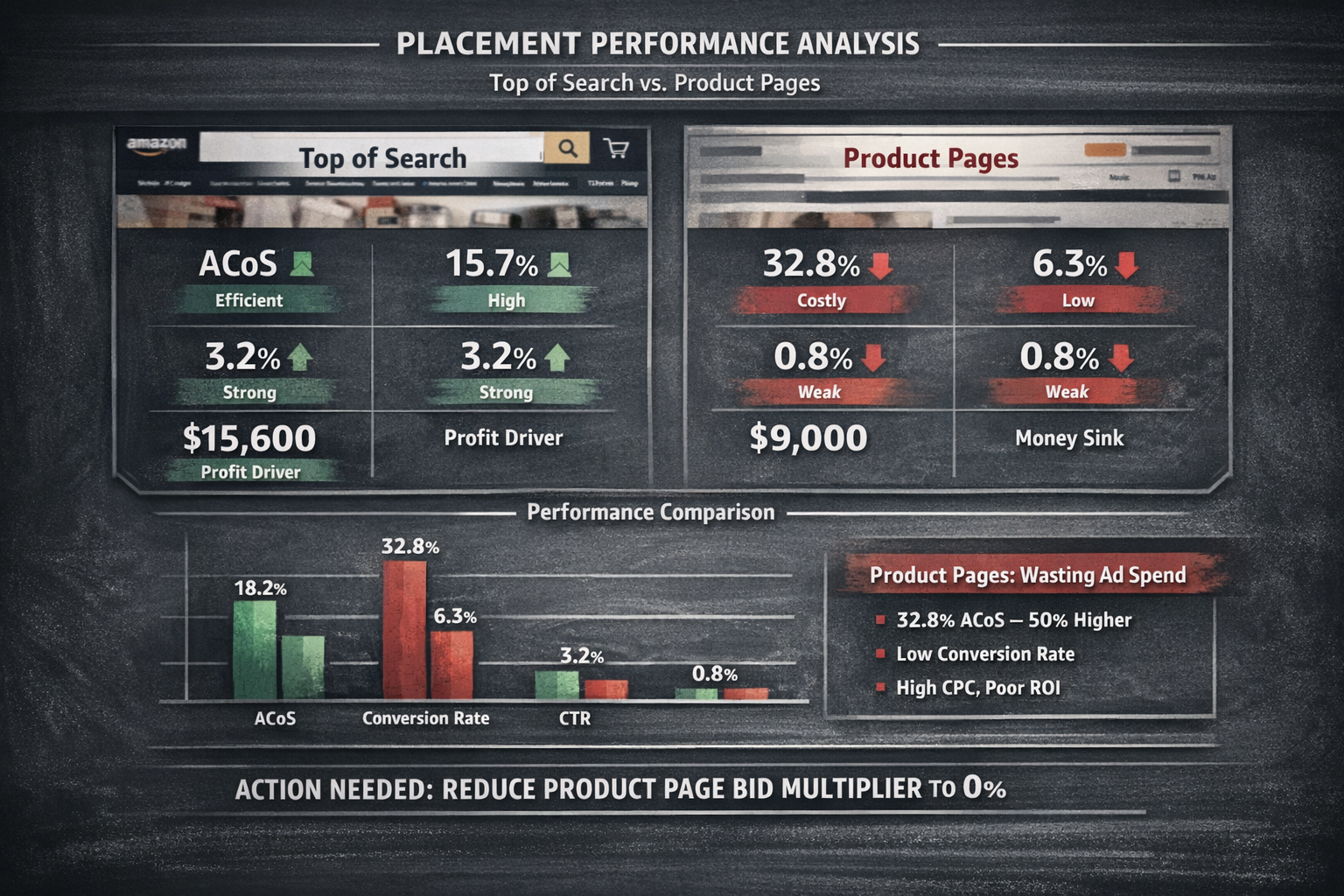
Check #9: Placements Underperforming
Amazon shows your ads in three places: top of search, rest of search, and product pages.
Most sellers have no idea which placements actually convert.
How to check: In Campaign Manager, select a campaign and click the Placements tab. Compare ACoS across "Top of Search," "Rest of Search," and "Product Pages."
Often, product page placements burn money while top-of-search drives profitable sales.
Red flag: Product page placement ACoS more than 50% higher than top-of-search.
Action item: Reduce product page bid multiplier to 0% and reallocate budget.
Check #10: Auto Campaigns Running Unchecked
Auto campaigns are great for discovery. Terrible for efficiency.
If you're not harvesting winners into manual campaigns and negating losers weekly, your auto campaigns are just expensive randomness.
Red flag: Auto campaigns with no negative keywords added in the last 30 days.
Category 3: Negative Keyword Hygiene (5 Checks)
Negative keywords are your profit protection system. Most sellers add them once, maybe twice, then forget they exist.
That's like installing a security system and never changing the batteries.
Check #11: Non-Converting Terms Added Weekly
This isn't a monthly task. It's weekly. At minimum.
Your search term report generates new non-converting terms constantly. Every week you don't negate them, you're paying for clicks that will never convert.
Red flag: No negative keywords added in the past 14 days.
Check #12: Negative Phrase vs Exact Used Correctly
Negative exact blocks one specific term. Negative phrase blocks anything containing that phrase.
Use exact when you want precision (blocking "cheap" but allowing "cheap alternative to brand X"). Use phrase when you want coverage (blocking all variations of "wholesale").
Most sellers default to exact for everything and miss obvious variations.
Red flag: Only negative exact keywords with no phrase negatives for broad irrelevant categories.
Check #13: Brand Protection Negatives in Place
Your branded terms should live in dedicated branded campaigns where you control the bid and budget.
In your generic campaigns? Your brand name should be negated so you're not paying premium generic CPCs for people already searching your brand.
Red flag: Brand terms appearing in generic campaign search term reports.
Check #14: Competitor Terms Negated Where Appropriate
If you're not running competitor campaigns, make sure competitor brand names aren't triggering your ads. You'll pay high CPCs for low-intent traffic.
Red flag: Competitor ASINs or brand names appearing in generic campaign search terms.
Check #15: Cross-Contamination Between Campaigns
When the same keyword lives in multiple campaigns, they compete against each other. You bid against yourself.
Use campaign-level negatives to prevent this. Your exact match campaigns should have the same terms negated in your phrase and broad campaigns.
Red flag: Same search term triggering multiple campaigns with different ACoS.
Category 4: Match Type Mix (4 Checks)
Match types control how broadly or narrowly Amazon interprets your keywords. Get the balance wrong and you either miss opportunities or burn money on irrelevant traffic.
Check #16: Balance of Broad, Phrase, and Exact
There's no universal perfect ratio—it depends on your goals, product lifecycle, and category competitiveness.
But a healthy account typically allocates more budget to exact match (higher intent, more control) while using broad and phrase for discovery. The key is having a systematic process to graduate winners from broad to exact.
Red flag: More than 60% of spend going to broad match without a systematic harvesting process.
Check #17: Exact Match Campaigns Getting Budget Priority
Exact match terms have proven themselves. They've converted. They've earned their spot.
If your exact match campaigns are hitting daily budget caps while broad match campaigns run freely, your priorities are backwards.
Red flag: Exact match campaigns limited by budget while broad match campaigns underspend.
Check #18: Duplicate Keywords Across Match Types Not Competing
You should absolutely have the same keyword in multiple match types—but with proper negation so they don't compete.
When "wireless earbuds" lives in both phrase and exact campaigns, negate the exact version in your phrase campaign. Force traffic to the right bucket.
Red flag: Same keyword in multiple match types with no negative keyword isolation.
Check #19: Search Term Isolation System in Place
When a search term proves itself (consistent conversions, good ACoS), it graduates.
From auto to manual. From broad to phrase. From phrase to exact.
This is search term isolation—the process that turns discovery spend into profit-driving precision.
Red flag: No documented process for promoting winning search terms.
Category 5: Placement and Bid Strategy (4 Checks)
Where your ads show and how you bid determines whether you're buying conversions or buying impressions.
Most sellers set bids and forget them. That's like setting your thermostat in January and never adjusting for July.
Check #20: Top-of-Search Performance vs Cost
Top-of-search placements typically convert better but cost more. Check the math.
If top-of-search ACoS is within your target while other placements aren't, increase your top-of-search modifier and let Amazon spend more there.
Red flag: Top-of-search converting profitably with modifier still at 0%.
Check #21: Product Page Placement ROI
Product page placements show your ad on competitor listings. Sounds great in theory.
In practice, these often convert poorly because shoppers are already committed to another product. However, there are exceptions—defensive strategies to protect market share or conquest campaigns against weak competitors can justify the spend.
Red flag: Product page ACoS more than double your top-of-search ACoS with no strategic rationale.
Action item: If performance is poor and there's no defensive strategy in place, drop product page modifier to 0% and reallocate that budget.
Check #22: Rest-of-Search Waste
"Rest of search" is Amazon's catch-all for everything that isn't top-of-search or product pages.
These placements often have high impressions, low clicks, and poor conversion. Monitor closely.
Red flag: Rest of search driving more than 40% of spend with ACoS 50%+ above target.
Check #23: Dynamic vs Fixed Bidding Alignment
Amazon offers three bidding strategies: down only, up and down, and fixed.
"Up and down" gives Amazon permission to increase your bids by up to 100% for what it considers high-converting opportunities. The catch? Amazon's incentive is to maximize spend, not your profit.
Most profit-focused sellers use "down only" or fixed bids with manual adjustments based on their own data.
Red flag: "Up and down" bidding enabled without understanding the cost implications or tracking the actual impact.
Category 6: Budget Allocation (4 Checks)
The final category—and the one where most sellers leave the most money on the table.
Budget allocation is simple in theory: feed winners, starve losers. In practice, most accounts do the opposite—spreading budget evenly across campaigns regardless of performance.
Check #24: Top Campaigns Getting Adequate Budget
Your best-performing campaigns should never hit budget caps before end of day.
If a campaign is converting profitably and running out of budget at 2pm, you're leaving sales on the table.
How to check: In Campaign Manager, look for campaigns showing "Limited by budget" status. Cross-reference with ACoS—if it's below target and budget-limited, that's money you're not making.
Red flag: Profitable campaigns hitting daily budget limits while unprofitable campaigns run freely.
Check #25: Low-Performing Campaigns Draining Budget
Zombie campaigns. The ones nobody checks but keep spending.
Sort your campaigns by spend, then by ACoS. How many are spending real money while delivering terrible results?
Red flag: More than 20% of total spend going to campaigns with ACoS above target.
Action item: Pause, restructure, or dramatically reduce budgets on underperformers.
Check #26: Room to Scale Winners
Here's a question most sellers never ask: if I found $5k in wasted spend, where would I reallocate it?
If you can't immediately identify profitable campaigns with capacity to scale, that's a problem. You need headroom to capitalize on efficiency gains.
Red flag: No clear winners ready to absorb additional budget.
Check #27: Budget Pacing Throughout the Day
Some products convert better at certain times. If your budget depletes early, you might be missing prime conversion hours.
Check hourly performance reports in Brand Analytics or third-party tools.
Red flag: Campaigns depleting budget before 6pm while conversion rates spike in evening hours.
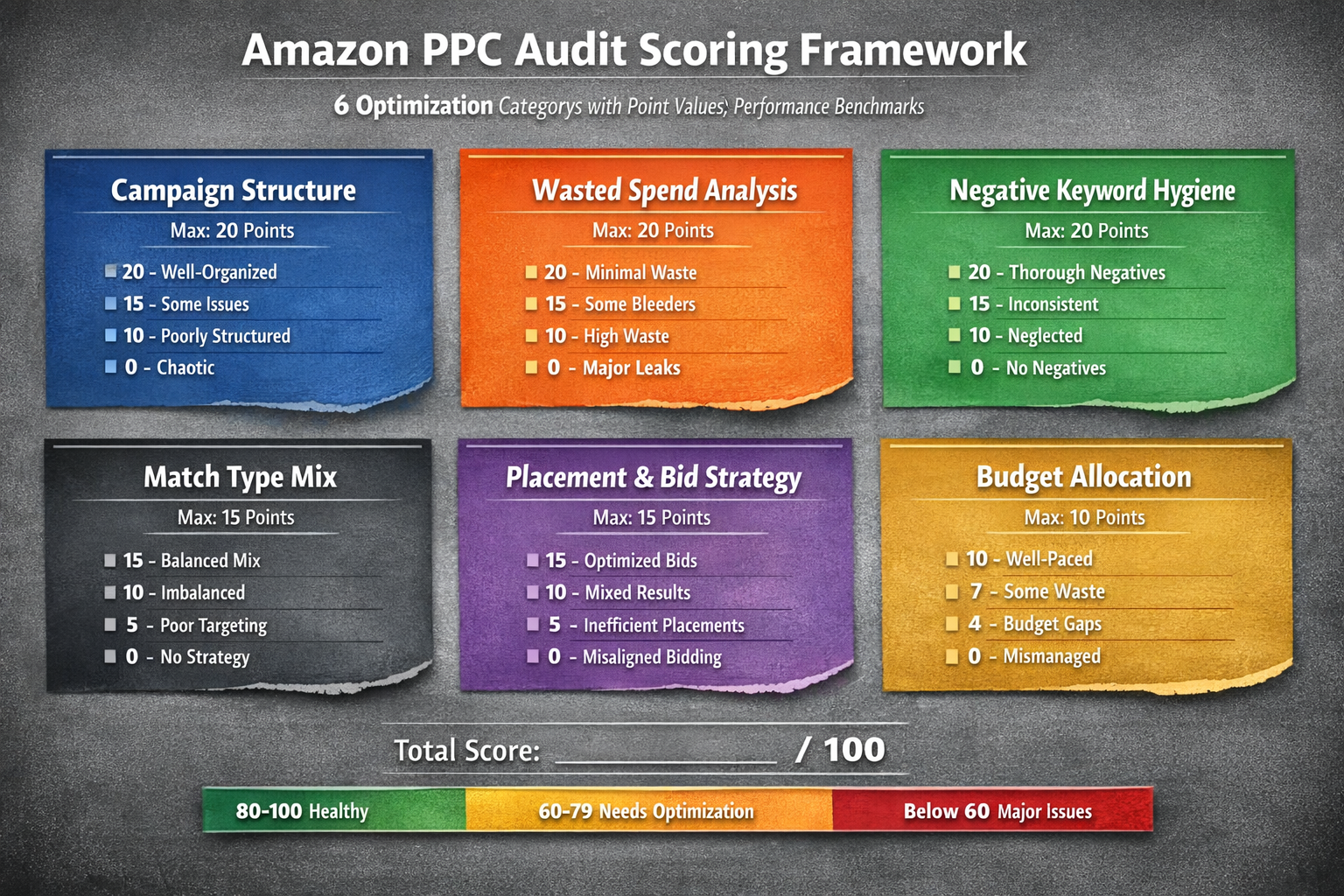
Your Amazon PPC Audit Scoring Framework
Now that you've run through all 27 checks, let's score your account.
| Category | Max Points | Example Score | Your Score |
| Campaign Structure | 20 | 15 | ___ |
| Wasted Spend Analysis | 20 | 10 | ___ |
| Negative Keyword Hygiene | 20 | 12 | ___ |
| Match Type Mix | 15 | 11 | ___ |
| Placement & Bid Strategy | 15 | 9 | ___ |
| Budget Allocation | 10 | 7 | ___ |
| Total | 100 | 64 | ___ |
Scoring each category:
Full points: All checks pass
75% points: Minor issues, easily fixed
50% points: Significant gaps requiring attention
25% points: Major problems affecting performance
0 points: Category is broken or non-existent
The example score of 64 represents a typical account I audit—functional but leaking profit in multiple areas.
What Your Score Means
80-100: Healthy AccountYour foundation is solid. Focus on incremental optimization and scaling winners. Consider testing new strategies like dayparting or expanded keyword discovery.
60-79: Needs OptimizationYou've got leaks. Probably spending 20-30% more than necessary for your results. Prioritize the lowest-scoring categories first. A systematic 30-day optimization push could reclaim significant profit.
Below 60: Major IssuesThis account is bleeding. Every week you wait costs real money. You need a comprehensive restructure, not tweaks.
The Compound Effect of Regular Audits
One audit is a diagnostic. Monthly audits are a profit system.
Here's what happens when you run this checklist every 30 days:
Month 1: You identify the obvious bleeders. Cut 15-25% wasted spend.
Month 2: You catch new waste before it compounds. Reallocate to emerging winners.
Month 3: Your match type structure tightens. Search term isolation kicks in.
Month 6: Your account runs leaner than 90% of competitors. TACoS drops while sales hold.
Month 12: You've compounded efficiency gains. Same ad spend, dramatically more profit.
This is how the Profit Feedback Loop works: Launch with intent. Prune wasted spend fast. Analyze. Iterate. Repeat.
The sellers who build valuable, exit-ready businesses aren't the ones chasing low ACoS vanity metrics. They're the ones with systems that protect profit month after month.
What to Do With Your Audit Results
You've got your score. You've identified the red flags.
Now what?
If you scored 80+: Congratulations—you're in the minority. Keep running this audit monthly and focus on scaling what works.
If you scored 60-79: Block two hours this week. Fix the top three issues in your lowest-scoring category. Then schedule next month's audit.
If you scored below 60: You need help. Not more tactics—a systematic restructure of how your account is managed.
Not sure how to fix what you found? Book a free audit call with PPC Maestro. We'll walk through your account together, identify the biggest profit leaks, and show you exactly what needs to change.
No pitch. No pressure. Just clarity on where your money is going and how to get more of it back.
Frequently Asked Questions
How often should I run an Amazon PPC audit?
Monthly is the minimum for accounts spending $10k or more. Weekly spot-checks on wasted spend and negative keywords are even better. The more frequently you catch problems, the less they cost you. Think of it like checking your bank statement—you don't wait until year-end to notice fraudulent charges.
What's the most common issue you find in PPC audits?
Wasted spend on non-converting search terms. It's not close. Most accounts I audit have 20-35% of spend going to keywords that have never generated a single order. This happens because nobody is systematically reviewing search term reports and adding negatives weekly.
Can I run this audit if an agency manages my account?
Absolutely—and you should. Ask your agency for the reports you need: search term data, placement performance, campaign-level ACoS. If they can't provide these or push back on transparency, that's a red flag. Your money, your data, your right to audit.
What's the difference between ACoS and TACoS for audit purposes?
ACoS measures ad efficiency (ad spend ÷ ad sales). TACoS measures ad dependency (ad spend ÷ total sales). For audits, ACoS tells you if individual campaigns are efficient. TACoS tells you if your overall advertising strategy is sustainable. Both matter, but TACoS is the better indicator of business health.
How do I know if my wasted spend is "normal" or a problem?
Some waste is inevitable—that's the cost of discovery. But keeping wasted spend below 15% of total ad spend is a reasonable benchmark for established products. Above 20%? You've got a systematic problem. Above 30%? Someone isn't watching the account.
About PPC Maestro
PPC Maestro is a profit-first Amazon PPC agency built for 7-figure sellers who are tired of watching ad spend climb while profits shrink. Founded by Bernard Nader, we've managed millions in Amazon ad spend using systematic, SOP-driven optimization focused on one metric that actually matters: net profit.
Our Profit Feedback Loop framework has helped sellers cut wasted spend by 30%+ while scaling revenue—not through guru tweaks, but through repeatable systems that work account after account. Check our results or download our free SOPs to see the approach in action.
Cited Works
[1] Amazon Advertising — "Sponsored Products Campaign Structure." https://advertising.amazon.com/library/guides/sponsored-products-campaign-structure
[2] Amazon Advertising — "Advertising Reports Overview." https://advertising.amazon.com/API/docs/en-us/reporting/v3/report-types
[3] Amazon Seller Central — "Campaign Bidding Strategies." https://sellercentral.amazon.com/help/hub/reference/G201955330