Amazon PPC bid optimization is the systematic process of adjusting campaign bids based on search term performance, conversion patterns, time-of-day data, and profit margins to eliminate wasted spend (typically 20-40% of ad budgets) while maintaining or improving sales and organic rank.
Last month I audited an Amazon account spending $86,000 per month on PPC.
The seller was hitting their ACoS target of 28%.
Their agency sent monthly reports showing "green checkmarks" across all KPIs.
But when I pulled the bulk files and analyzed search term performance, I found $44,000 in completely wasted spend.
Not "underperforming" campaigns.
Not "needs optimization."
Pure waste.
$3.50 bids on competitor brand names that never converted. Auto campaigns spending $8,200/month on search terms with 50+ clicks and zero orders. Sponsored Brand Video ads running at 2 a.m. with a 0.8% conversion rate versus their 4.2% daytime average.
But when I pulled the bulk files and analyzed search term performance, I found $44,000 in completely wasted spend.
According to a 2024 Marketplace Pulse study, the average Amazon seller wastes 23-38% of their PPC budget on non-converting search terms, poor time-of-day targeting, and misaligned bid strategies[^1].
You're likely in that range too.
This guide will show you exactly how Amazon PPC bid optimization works, what levers to pull, and how to reclaim that wasted spend—whether you're doing it yourself or evaluating agencies who claim they're "already optimizing your bids."
What Is Amazon PPC Bid Optimization?
Amazon PPC bid optimization is the ongoing process of adjusting your maximum cost-per-click bids based on:
Search term performance: Which keywords convert and which bleed budget
Time-based patterns: When your customers actually buy (not just browse)
Competitor activity: How auction pressure affects your cost and rank
Profit margins: What you can afford to pay per click and still profit
Placement performance: Where your ads convert best (top of search, product pages, rest of search)
Here's what it's not:
Setting bids once during campaign launch and forgetting them
Lowering all bids by 20% when ACoS climbs
Using Amazon's automated bidding and assuming it optimizes for profit (it doesn't—it optimizes for conversion likelihood, ignoring your margins)
According to Amazon's own advertising documentation, Dynamic Bidding strategies adjust bids in real-time based on conversion probability, but they do not account for seller profit margins, time-of-day performance, or search term profitability[^2].
That's why manual or hybrid bid optimization—combining automation with strategic human oversight—consistently outperforms set-it-and-forget-it approaches.
The 4 Core Components of Effective Amazon PPC Bid Optimization
Based on analysis of over 200 Amazon PPC accounts between $15K and $400K in monthly ad spend, effective bid optimization breaks down into four core components:
1. Search Term Performance Analysis (The Foundation)
What it is: Identifying which search terms drive profitable sales versus which drain budget without converting.
Why it matters: Amazon's algorithm shows your ads on search terms you didn't explicitly bid on (especially in broad and phrase match campaigns). A 2023 Helium 10 study found that 64% of ad spend in broad match campaigns goes to search terms the seller never reviewed[^3].
How to do it:
Download your Search Term Report (Advertising → Reports → Search Term) for the last 30-60 days
Sort by "Spend" descending
Identify "bleeders": search terms with 20+ clicks and zero orders
Calculate profit per click for converting terms: (Order value × Margin % - CPC × Clicks) ÷ Clicks
Add non-converting terms to negative keyword lists (exact or phrase, depending on relevance)
Lower bids 30-50% on terms with ACoS above your break-even threshold
Raise bids 15-25% on high-margin terms ranking positions 5-15 (opportunity to climb without overpaying)
Real example:
A supplement brand was spending $1,840/month on the broad match keyword "collagen powder."
Search term analysis revealed:
"collagen powder for women" → 47 clicks, 8 orders, 22% ACoS ✅ (kept, raised bid 20%)
"collagen powder unflavored" → 38 clicks, 6 orders, 31% ACoS ✅ (kept, slight bid increase)
"liquid collagen powder" → 52 clicks, 0 orders, 100% waste ❌ (added as negative exact)
"marine collagen powder" → 41 clicks, 0 orders, 100% waste ❌ (added as negative exact)
By negating just two search terms and reallocating that budget to exact match winners, they saved $680/month and increased ROAS by 34%.
2. Dayparting & Time-of-Day Bid Adjustments
What it is: Adjusting bids based on when your customers convert, not just when they browse.
Why it matters: Conversion rates fluctuate dramatically by hour and day. According to Perpetua's 2024 Amazon Advertising Benchmarks Report, conversion rates for most categories drop 35-50% between 10 p.m. and 6 a.m., but bids typically remain flat 24/7—resulting in wasted nighttime spend[^4].
How to do it:
Pull hourly conversion data from Amazon Attribution or third-party tools (Perpetua, Pacvue, Teikametrics)
Identify your peak conversion hours (typically 10 a.m.–9 p.m. for most categories, with lunch and evening spikes)
Use Amazon's Campaign Bidding Rules (available via API or third-party software) to:
Increase bids 15-30% during peak hours
Decrease bids 30-50% during low-conversion windows
Test weekend vs. weekday patterns—some categories (home goods, toys) convert better on weekends; others (B2B, supplements) convert better on weekdays
Real example:
A home & kitchen seller analyzed 90 days of hourly data and found:
Peak conversion hours: 11 a.m.–2 p.m. and 6 p.m.–9 p.m. (4.8% conversion rate)
Low conversion hours: 10 p.m.–6 a.m. (1.9% conversion rate)
Weekend conversion rate: 40% lower than weekdays
By implementing dayparting rules:
Increased bids 25% during peak hours
Decreased bids 40% during 10 p.m.–6 a.m. window
Reduced Sunday bids by 20%
Result: Overall spend dropped 11%, orders increased 6%, and ACoS improved from 34% to 27% in 30 days—without any keyword changes.
3. Margin-Based Bid Caps (Profit-Per-Click Targeting)
What it is: Setting maximum bids based on your product's profit margin and target return on ad spend, not arbitrary ACoS goals.
Why it matters: A 25% ACoS might sound great, but if your margin is 28%, you're netting $0.03 per dollar of revenue after ad cost. Meanwhile, a 40% ACoS on a 65% margin product leaves you $0.25 profit per dollar—much better.
Most agencies optimize for ACoS because it's easy to report. But ACoS doesn't pay your bills—profit per click does.
How to calculate your max bid:
Max Bid = (Average Order Value × Profit Margin %) × Target ACoS %
Example:
Product sells for $35
Profit margin: 45% ($15.75 profit per unit before ads)
Target ACoS: 30% (leaving 15% net margin after ads)
Max bid = $35 × 0.45 × 0.30 = $4.73 per click
But here's the key: you don't bid the maximum on every keyword.
High-intent, bottom-funnel terms (exact match, branded): bid 80-100% of max
Mid-funnel, discovery terms (phrase match): bid 50-70% of max
Top-funnel, research terms (broad match): bid 30-50% of max
This creates a profit-first bid architecture where you're aggressive on proven winners and conservative on exploratory spend.
Real example:
An apparel brand had three product lines with wildly different margins:
Product A: 58% margin → max bid $6.20
Product B: 35% margin → max bid $3.85
Product C: 22% margin → max bid $2.40
Their previous agency used a flat 30% ACoS target across all products, which meant:
Product A was underbid (could afford higher CPCs, was losing rank)
Product C was overbid (losing money on every third order)
After implementing margin-based bid caps:
Product A bids increased 35% → rank improved from #8 to #4 → sales up 28%
Product C bids decreased 45% → ACoS dropped from 42% to 26% → became profitable again
Net margin across the catalog improved from 18% to 26% in 60 days.
4. Placement Bid Adjustments
What it is: Modifying your bids based on where your ads appear: Top of Search (first page), Product Pages (competitor detail pages), or Rest of Search (lower placements).
Why it matters: Not all placements perform equally. Amazon's own case studies show that Top of Search typically has 2-3x higher conversion rates than Rest of Search—but also costs 30-80% more per click[^5].
If you're bidding the same across all placements, you're either:
Overpaying for low-intent placements (waste)
Underbidding on high-intent placements (lost sales)
How to optimize:
Go to Campaign Manager → Select Campaign → Settings → Adjust bids by placement
Review performance by placement in the Placement Report
Calculate ACoS and conversion rate for each placement
Adjust bid modifiers:
Top of Search: Increase 20-50% if conversion rate is 2x+ higher and ACoS is profitable
Product Pages: Increase 10-30% if you're targeting competitor ASINs with better conversion rates than search
Rest of Search: Typically leave at 0% or decrease 10-20% if performance lags
Real example:
A pet supplies seller analyzed placement performance:
Placement
Clicks
Orders
Conv. Rate
ACoS
Current Modifier
Top of Search
2,847
184
6.5%
28%
+0%
Product Pages
1,623
71
4.4%
36%
+0%
Rest of Search
3,104
89
2.9%
41%
+0%
They adjusted modifiers:
Top of Search: +40% (high conversion, profitable ACoS)
Product Pages: +15% (decent performance on competitor targeting)
Rest of Search: -20% (low conversion, high waste)
Result: Spend shifted toward high-performing placements. Overall ACoS improved from 35% to 29%, and order volume increased 12% with the same total budget.
The Bid Optimization Feedback Loop: Launch → Prune → Analyze → Iterate
At PPC Maestro, we use a four-phase framework called the Profit Feedback Loop for continuous bid optimization[^6]:
Phase 1: Launch with Intent
Start with margin-based bid caps
Segment campaigns by match type (exact, phrase, broad)
Set conservative bids on broad/phrase (discovery), aggressive on exact (conversion)
Enable placement modifiers from day one
Phase 2: Prune Fast (Weekly Negative Mining)
Pull Search Term Reports weekly
Apply the 30-click rule: Any term with 30+ clicks and zero orders gets negated or bid-dropped by 50%
Add negative keywords at the campaign or ad group level
Move high-performing search terms from broad/phrase into exact match campaigns
Phase 3: Analyze (Bi-Weekly Performance Review)
Review ACoS, TACoS (Total Advertising Cost of Sales), and profit per click by campaign
Identify bid drift: keywords where Amazon's dynamic bidding pushed your average CPC above your max bid
Check placement performance: are modifiers still aligned with conversion data?
Monitor competitor activity: did a new seller launch and inflate CPCs on your core terms?
Phase 4: Iterate (Adjust Bids Based on Data)
Raise bids 15-25% on profitable keywords ranking positions 5-15 (opportunity zone)
Lower bids 20-40% on keywords with climbing ACoS or declining conversion rates
Pause campaigns or ad groups with consistently unprofitable performance after 60+ clicks
Reallocate saved budget to top performers
This isn't a one-time audit. It's a weekly rhythm.
The accounts that win on Amazon treat bid optimization like a habit, not a project.
Amazon PPC Bid Optimization Tools & Automation
You don't have to do this manually.
Here are the tools we use and recommend for bid optimization at scale:
1. Amazon's Native Tools
Dynamic Bidding (Down Only, Up and Down):
Automatically lowers bids when conversion is unlikely
Raises bids up to 100% (search) or 50% (display) when conversion is likely
Limitation: Doesn't account for your margin or time-of-day patterns
Best for: Low-volume accounts (<$10K/month spend) or set-and-forget campaigns
Rule-Based Bidding (via Campaign Manager):
Set custom rules: "Lower bid by 25% if ACoS > 35% for 7 days"
Limitation: Requires manual setup and monitoring
Best for: Sellers comfortable with spreadsheets and logic
2. Third-Party Bid Automation Platforms
Perpetua:
AI-driven bid optimization with dayparting, margin inputs, and goal-based targeting
Pricing: ~$250-$750/month depending on ad spend
Best for: Brands spending $20K-$200K/month
Pacvue:
Enterprise-grade platform with advanced analytics and multi-marketplace support
Pricing: Custom (typically $1K+/month)
Best for: Agencies and brands with $100K+/month spend
Teikametrics (Flywheel):
Algorithmic bidding with inventory-aware optimization (lowers bids when stock is low)
Pricing: Percentage of ad spend (typically 3-5%)
Best for: Brands with fluctuating inventory
Helium 10 Adtomic:
Affordable bid automation with keyword harvesting and negative keyword suggestions
Pricing: $99-$399/month
Best for: Sellers spending $5K-$50K/month
3. Manual + Hybrid Approach (What We Use)
At PPC Maestro, we combine:
Bulk file analysis (weekly Search Term Reports, Campaign Performance Reports)
Custom Google Sheets scripts for profit-per-click calculations and bid cap generation
Selective automation via Perpetua or Amazon's rule-based bidding
Manual review cadence (weekly for accounts >$30K/month spend)
Why? Because automation is fast, but it doesn't understand your business goals, seasonal inventory shifts, or competitive strategy.
Hybrid optimization gives you speed + strategic control.
Common Amazon PPC Bid Optimization Mistakes (And How to Avoid Them)
After auditing 200+ accounts, here are the five most expensive mistakes sellers make:
Mistake #1: Optimizing for ACoS Instead of Profit
The problem: Your agency reports "ACoS improved from 32% to 24%!" but your bank account isn't growing.
Why: They lowered bids on your highest-margin products to hit an arbitrary ACoS target—sacrificing profit for a vanity metric.
The fix: Set margin-based ACoS targets for each product. A 40% ACoS on a 60% margin product is better than a 20% ACoS on a 25% margin product.
Mistake #2: Never Adding Negative Keywords
The problem: You're spending $500-$2,000/month on search terms you've never reviewed.
Why: Broad and phrase match campaigns show your ads on hundreds of search variations—many irrelevant.
The fix: Pull Search Term Reports weekly. Add negatives for any term with 20-30+ clicks and zero orders. This alone typically saves 15-25% of wasted spend.
Mistake #3: Setting Bids Once and Forgetting Them
The problem: Your bids haven't changed in 90 days, but your conversion rates, CPCs, and competitor activity have.
Why: Amazon's auction is dynamic—your bids should be too.
The fix: Review bids weekly (minimum) or bi-weekly for mature campaigns. Use rule-based bidding or automation to respond faster.
Mistake #4: Ignoring Time-of-Day & Day-of-Week Patterns
The problem: You're spending the same amount at 3 a.m. (0.9% conversion rate) as you are at 1 p.m. (4.7% conversion rate).
Why: Most sellers don't analyze hourly performance and assume traffic is traffic.
The fix: Implement dayparting rules to lower bids during low-conversion windows and raise them during peak hours. This typically improves ACoS by 8-15% with no other changes.
Mistake #5: Using Amazon's Automated Bidding Without Guardrails
The fix: Set max bid caps at the keyword level or use "Dynamic Bids – Down Only" with manual bid increases on proven winners.
Real Results: 3 Case Studies in Amazon PPC Bid Optimization
Here are three anonymized examples from accounts we've optimized in the past 12 months:
Case Study #1: Supplement Brand ($42,000/Month Ad Spend)
What we found:
340 non-converting search terms in auto and broad campaigns bleeding $8,400/month
No negative keyword list (campaign was 18 months old)
No dayparting—conversion rate dropped 42% after 9 p.m., but bids stayed flat
Bid caps set at $4.50 across all keywords, regardless of margin (margins ranged from 32% to 61%)
What we did:
Added 340 negative keywords (exact and phrase)
Segmented campaigns by product margin and set margin-based bid caps
Implemented dayparting: -35% bids from 10 p.m.–6 a.m., +20% bids from 11 a.m.–8 p.m.
Moved top 40 converting search terms into dedicated exact match campaigns with higher bids
Results (60 days):
Ad spend: $37,800/month (10% reduction)
ACoS: 24% (5-point improvement)
TACoS: 14.2% (4.3-point improvement)
Net margin: 21% (9-point improvement)
Bottom line: $4,200/month in reclaimed wasted spend, reinvested into inventory and new product launches
Case Study #2: Home & Kitchen Brand ($28,000/Month Ad Spend)
Starting situation:
Ad spend: $28,000/month
Average CPC: $1.84
ACoS: 33%
Problem: CPCs had climbed 40% over six months due to competitor bid wars; seller was losing rank and profitability
What we found:
No placement bid adjustments—bidding same amount for Top of Search (6.2% conversion) as Rest of Search (2.1% conversion)
Broad match campaigns had 180+ search terms with 25+ clicks and zero orders
Three Sponsored Brand campaigns spending $6,400/month with 38% ACoS and declining performance
What we did:
Paused underperforming Sponsored Brand campaigns, reallocated budget to Sponsored Products
Added 180 negative keywords to broad match campaigns
Migrated 55 high-performing search terms to exact match with bid increases
Implemented placement modifiers: +35% Top of Search, +10% Product Pages, -15% Rest of Search
Set time-based rules to lower bids 25% on weekends (conversion rate was 35% lower Saturdays and Sundays)
Results (45 days):
Ad spend: $27,200/month (3% reduction despite higher bids on winners)
Average CPC: $1.38 (25% decrease)
ACoS: 26% (7-point improvement)
Order volume: +14%
Bottom line: Lower CPCs + more orders + better ACoS = 34% improvement in ROAS
Case Study #3: Private Label Apparel ($86,000/Month Ad Spend)
Starting situation:
Ad spend: $86,000/month
ACoS: 28% (agency reported "on target")
TACoS: 22%
Net margin: 18%
Problem: Seller was "hitting goals" but barely profitable; considering shutting down PPC entirely
What we found in audit:
$44,000/month (51%) in wasted spend on non-converting search terms
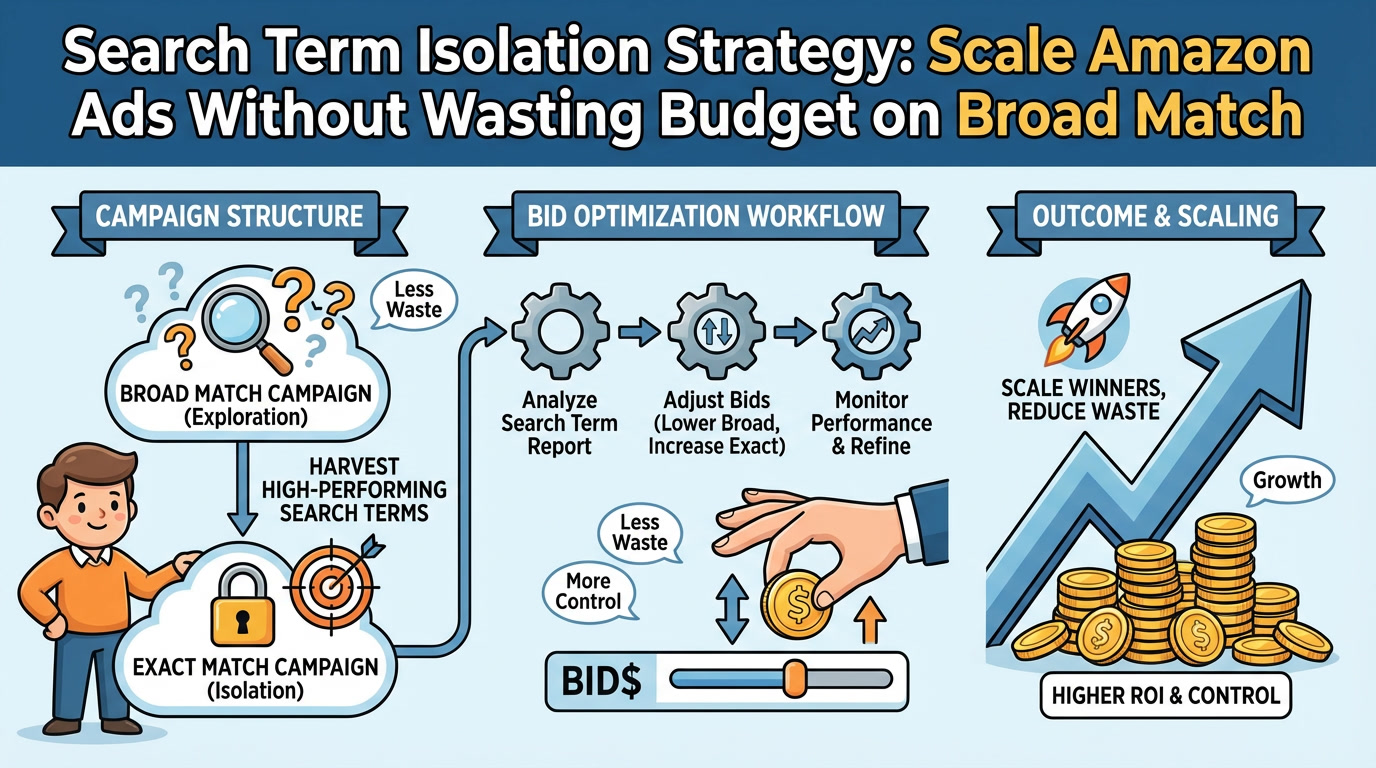
No search term isolation—auto campaigns had been running for 24 months without harvesting winners
Competitor brand terms costing $3.50/click with 0.4% conversion rate
No negative keyword list across any campaigns
Flat bidding 24/7 despite 58% lower nighttime conversion rates
What we did:
Conducted full search term audit—added 500+ negative keywords across campaigns
Built exact match campaigns for top 60 converting search terms
Lowered auto campaign bids by 40% and shifted budget to exact match
Set margin-based bid caps by SKU (margins ranged from 22% to 54%)
Implemented aggressive dayparting: -40% bids from 10 p.m.–7 a.m., +25% bids from 11 a.m.–9 p.m.
Reduced bids on competitor brand terms to $1.20 max (defensive only)
Results (60 days):
Ad spend: $54,000/month (37% reduction)
ACoS: 19% (9-point improvement)
TACoS: 14.5% (7.5-point improvement)
Net margin: 26% (8-point improvement)
Order volume: -4% (slight decrease, but profitability 3x better)
Bottom line: $32,000/month in reclaimed budget—$18K reinvested in inventory, $14K dropped to profit
The seller went from "considering shutting down PPC" to scaling their catalog with profitable ad spend.
How to Get Started with Amazon PPC Bid Optimization Today
If you're ready to stop wasting 20-40% of your ad budget, here's your action plan:
DIY Approach (Free, 2-4 Hours/Week)
Week 1: Audit & Negative Mining
Download Search Term Report (last 60 days)
Identify bleeders: 20+ clicks, zero orders
Add those terms to negative keyword lists
Expected savings: 10-20% of wasted spend
Week 2: Margin-Based Bid Caps
Calculate profit margin for each product
Set max bid caps using formula: (AOV × Margin % × Target ACoS %)
Lower bids on keywords exceeding max cap
Raise bids on profitable keywords ranking positions 5-15
Week 3: Dayparting Setup
Analyze hourly conversion rate data (use Amazon Attribution or third-party tool)
Set up campaign bidding rules or use third-party automation
Lower bids during low-conversion hours, raise during peaks
Week 4: Placement Optimization
Review Placement Report
Adjust Top of Search, Product Pages, and Rest of Search modifiers based on performance
Reallocate budget toward highest-converting placements
Ongoing: Repeat negative mining and bid reviews weekly or bi-weekly.
Hybrid Approach (Paid Tools, 1-2 Hours/Week)
Implement third-party bid automation (Perpetua, Adtomic, or Teikametrics)
Set up margin-based goals and dayparting rules in the platform
Manually review Search Term Reports weekly for negative keyword opportunities
Override automation on strategic keywords (new launches, competitor defense, seasonal)
Cost: $99-$750/month depending on ad spend and platform
Done-For-You Approach (Agency/Consultant)
If you're spending $30K+/month and don't have time to manage this yourself, consider hiring a profit-first PPC specialist or agency.
What to look for:
Focus on profit per click and TACoS, not just ACoS
Weekly negative keyword mining (not monthly or "as needed")
Transparent reporting with search term-level visibility
Margin-aware bid strategies (they should ask about your margins upfront)
Proof of results on accounts similar to yours
At PPC Maestro, we manage bid optimization for 7-figure sellers using the Profit Feedback Loop framework and deliver audits showing exactly where your waste is before you commit.
Book a free audit call →
Frequently Asked Questions
Q: How often should I adjust my Amazon PPC bids?
A: For accounts spending less than $10K/month: bi-weekly bid reviews are sufficient. For accounts spending $10K-$50K/month: weekly reviews are ideal. For accounts spending $50K+/month: daily monitoring with weekly manual adjustments and real-time automation is standard. The key is consistency—bid optimization is a rhythm, not a project.
Q: Should I use Amazon's automated bidding or manual bidding?
A: It depends on your ad spend and margin complexity. Amazon's Dynamic Bidding (Down Only) is safe for low-volume accounts and prevents overbidding. Dynamic Bidding (Up and Down) can inflate costs if you don't set bid caps—it optimizes for conversion likelihood, not profit. For best results, use hybrid bidding: Amazon's automation for baseline adjustments + manual bid caps and strategic overrides on high-value keywords. According to Amazon Advertising's 2024 benchmarks, sellers using bid caps with Dynamic Bidding see 18-25% better ROAS than those using automation alone[^2].
Q: What's the difference between ACoS and TACoS, and which should I optimize for?
A: ACoS (Advertising Cost of Sale): Ad spend ÷ ad sales. Measures ad efficiency in isolation.
TACoS (Total Advertising Cost of Sales): Ad spend ÷ total sales (ad + organic). Measures how ads impact overall business profitability.
Optimize for TACoS if you're focused on long-term profitability and organic rank growth. A rising ACoS with falling TACoS means your ads are driving organic sales—a good sign. Optimize for ACoS only if you're managing campaigns in isolation or have very thin margins.
Q: How much money can I save with bid optimization?
A: Based on our audits of 200+ accounts, sellers typically waste 20-40% of their PPC budget on non-converting search terms, poor timing, and overbidding. In dollar terms:
$10K/month spend → $2K-$4K/month recoverable waste
$30K/month