
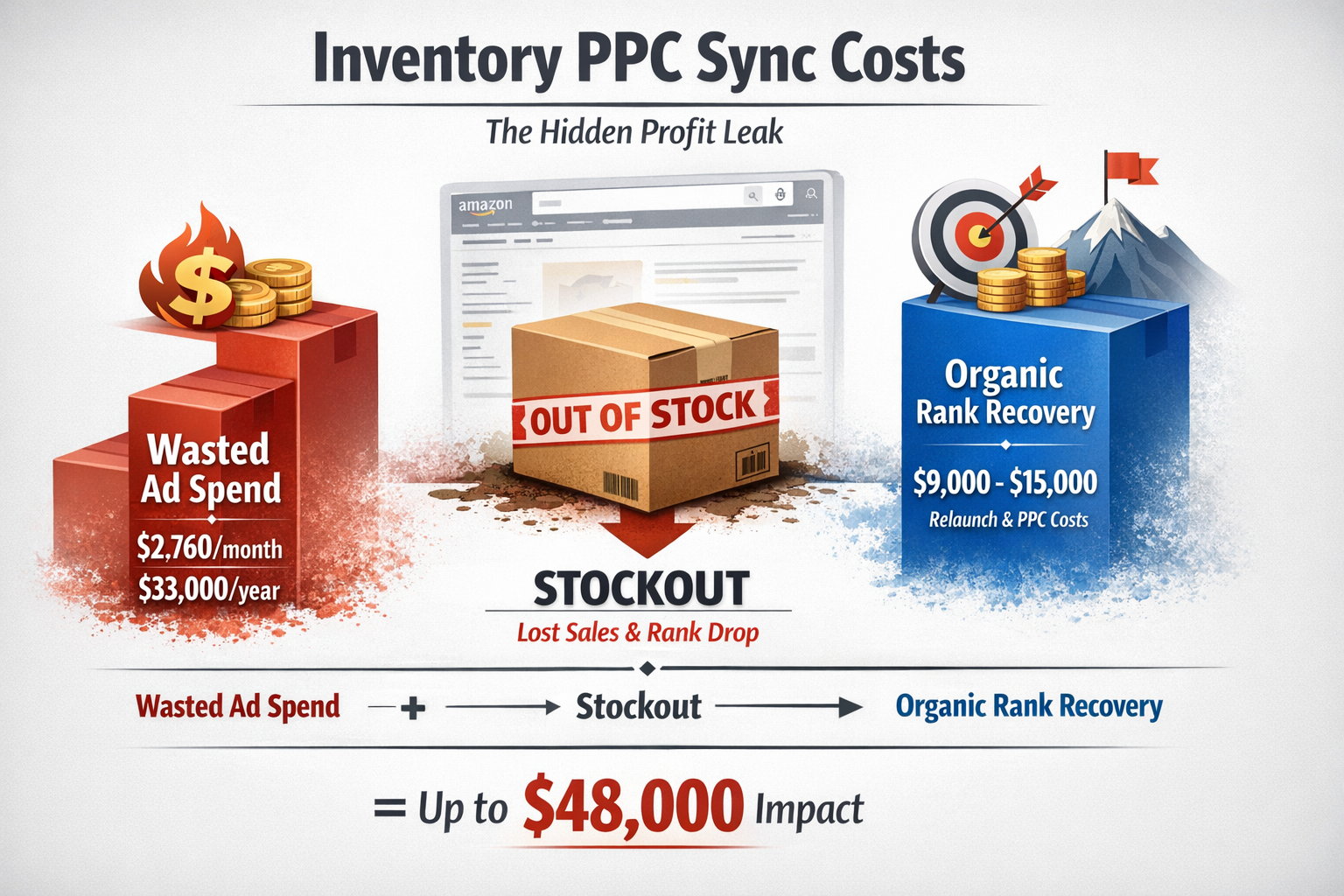
Last week I pulled an audit for a 7-figure supplement brand. They were spending $12,000/month on PPC. Solid campaigns. Great ACoS. One problem: 23% of that spend was going to SKUs with less than two weeks of inventory.
That's $2,760/month—$33,000/year—accelerating stockouts on products they couldn't replenish for another 45 days.
This isn't an edge case. It's an epidemic.
Most sellers treat inventory management and PPC as two separate functions. Inventory lives in a spreadsheet. PPC lives in Campaign Manager. They never talk to each other. And that disconnect is bleeding profit every single day.
Here's the brutal math: when you advertise a product into a stockout, you don't just waste the ad spend. You tank your organic rank. You lose the Buy Box. You hand your keyword positions to competitors who will defend them aggressively when you come back.
The recovery cost is 3-5x what you spent getting there in the first place.
Let me show you how to fix this.
Why Inventory-PPC Misalignment Is Your Hidden Profit Leak
Amazon's ranking algorithm rewards velocity. The faster you sell, the higher you rank. PPC accelerates velocity. That's the whole point.
But here's what most sellers miss: velocity without inventory control is a runaway train heading for a cliff.
When you stock out, three things happen simultaneously:
Your ad spend goes to zero ROI. Every click in those final days before stockout converts at declining rates as inventory depletes across fulfillment centers.
Your organic rank collapses. Amazon's search algorithm factors in sales velocity and availability. Stockouts signal unreliability. Your competitors inherit your keyword positions.
Your relaunch costs spike. Getting back to page one after a stockout typically requires 2-4 weeks of aggressive (often unprofitable) PPC to regain lost ground.
I've seen brands spend $50,000 building organic rank on a hero SKU, then lose it all because nobody told the PPC team that inventory was running low.
The fix isn't complicated. It just requires treating inventory and PPC as one system instead of two, a core Amazon PPC strategy.
Want to see exactly where your ad spend is leaking? Grab the free Wasted Ad Spend Calculator and run your numbers.
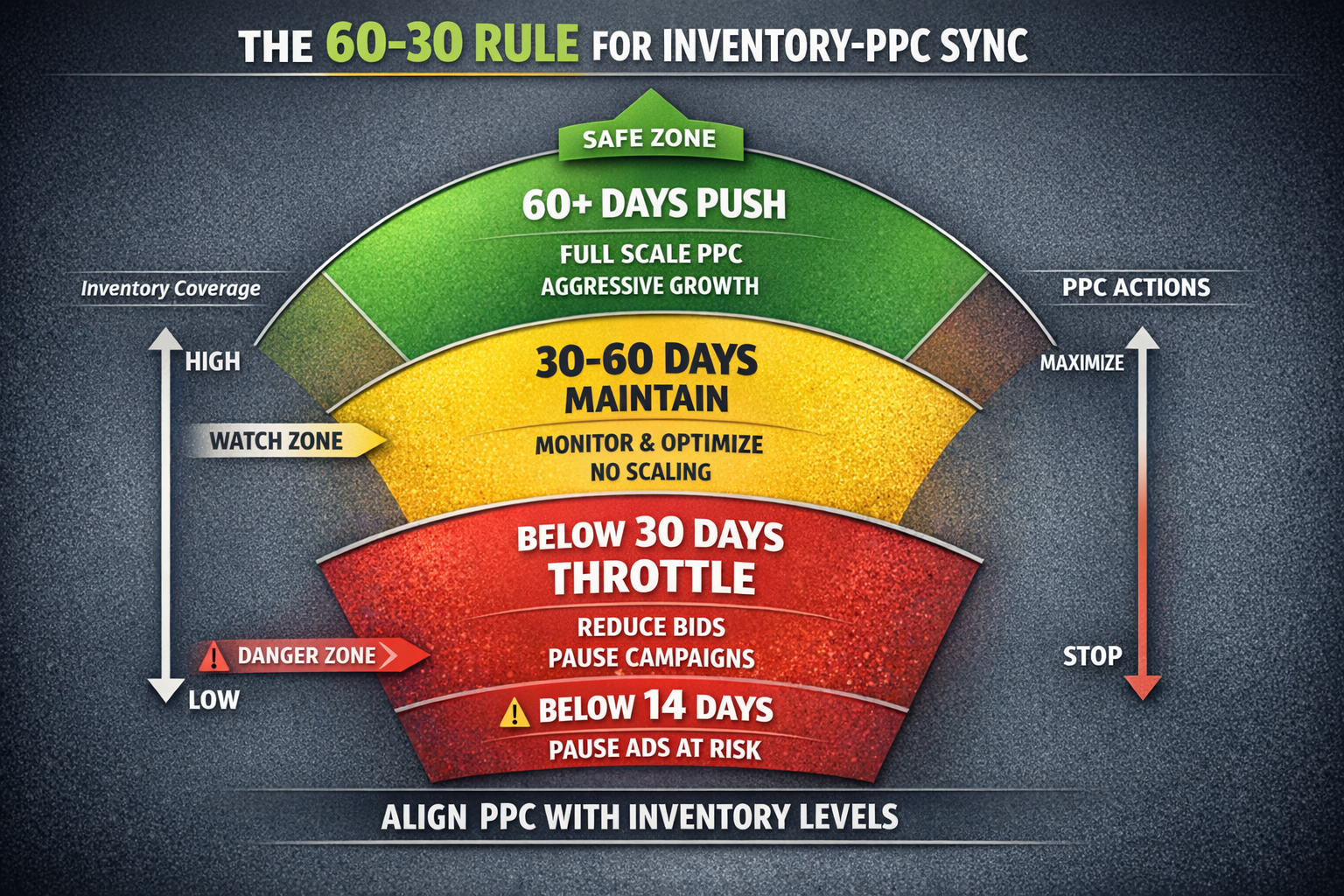
The 60-30 Rule: A Simple Framework for Inventory-PPC Sync
After managing millions in ad spend across dozens of accounts, I've landed on a straightforward framework. I call it the 60-30 rule.
60+ days of stock coverage: Push hard. This is your green zone. Maximize PPC velocity, test aggressive bids, scale winning campaigns. You have runway.
30-60 days of stock coverage: Maintain. Keep campaigns running at normal efficiency. Monitor weekly. No aggressive scaling.
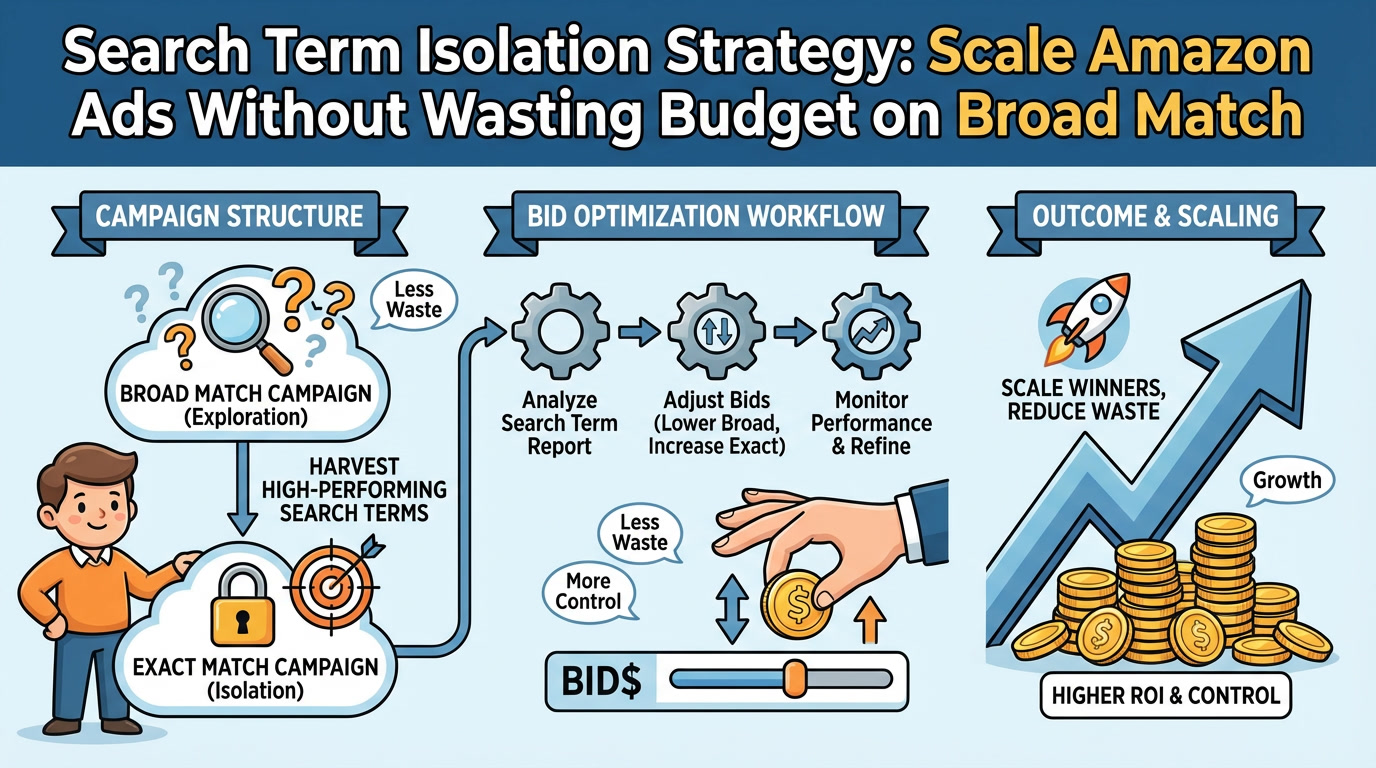
Below 30 days of stock coverage: Throttle. This is where match type matters. Pause your Auto campaigns and Broad match keywords first—these are your high-funnel discovery campaigns that burn budget fastest. Keep your Exact match and Branded campaigns running to protect your core keyword positions. Reduce bids on remaining campaigns by 30-50%.
Below 14 days of stock coverage: Pause. Full stop. The math doesn't work anymore.
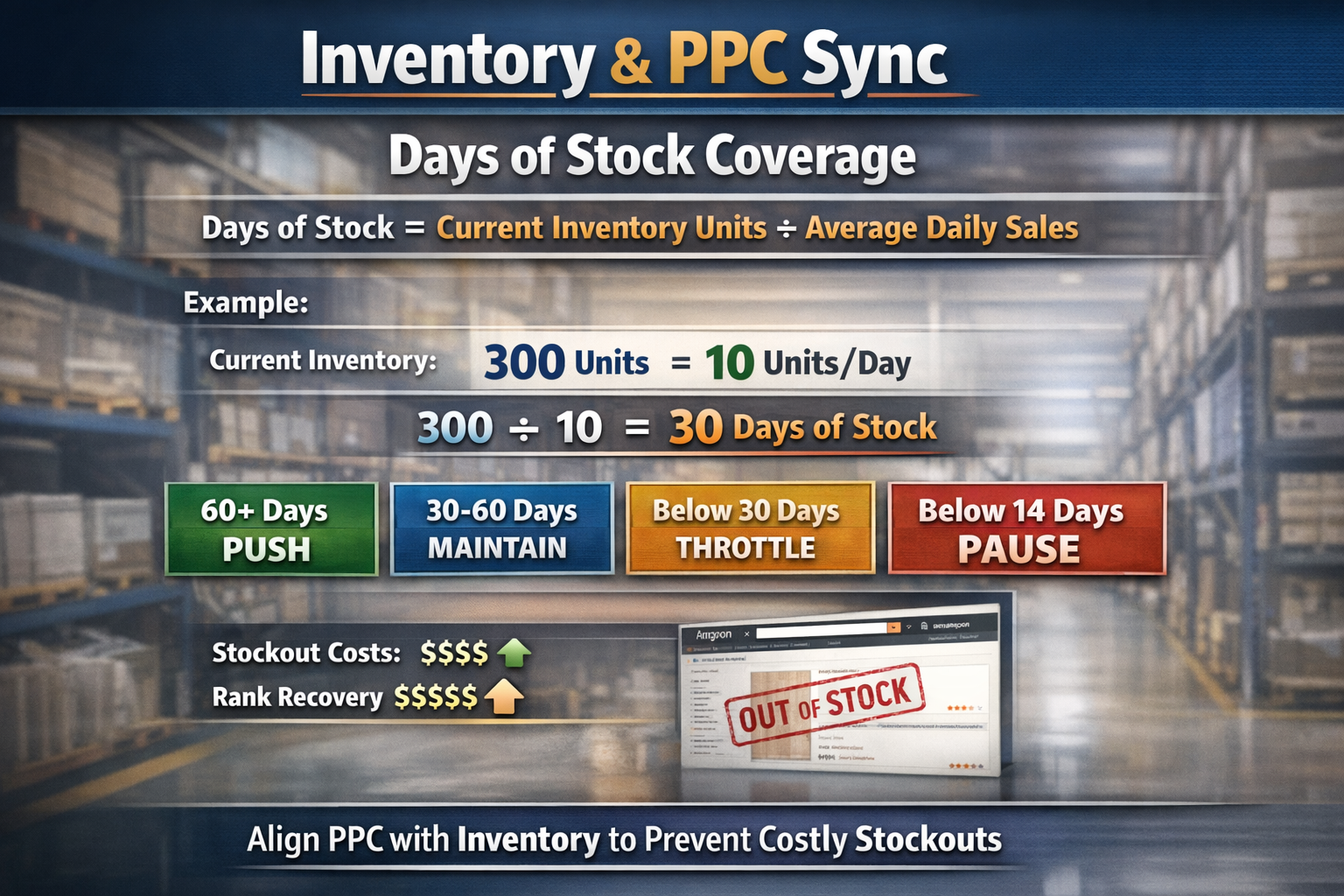
Here's the calculation for days of stock coverage:
Days of Stock = Current Inventory Units ÷ Average Daily Sales
If you have 300 units and sell 10/day, you have 30 days of coverage. That's your throttle zone.
Simple? Yes. But I guarantee 80% of sellers reading this have never once adjusted PPC based on inventory levels—let alone differentiated their response by campaign type.
Three Ways to Sync Inventory and PPC (From Manual to Automated)
Method 1: The Weekly Sync (Manual)
This takes 30 minutes per week. No tools required.
Step 1: Pull your inventory report from Seller Central (Reports → Fulfillment → Inventory Health)
Step 2: Calculate days of stock coverage for each advertised SKU
Step 3: Flag any SKU below 30 days
Step 4: In Campaign Manager, start by pausing Auto and Broad match campaigns for flagged SKUs. If inventory drops further, pause Exact match campaigns—but keep Branded terms running longest to protect your brand searches.
Step 5: Reallocate that budget to SKUs with 60+ days coverage
The problem with manual? It's easy to forget. Life happens. A busy week means your sync doesn't happen, and suddenly you're advertising into stockouts again.
Method 2: Price-Based Velocity Control
This is clever and underutilized—but requires caution.
When inventory drops below your threshold, raise prices by 10-15%. This naturally slows velocity without touching your campaigns.
Critical warning: Raising prices too aggressively can trigger Buy Box suppression. Amazon monitors your pricing against competitors and your own historical prices. If you raise prices beyond what Amazon considers "competitive," you may lose the Buy Box entirely—which kills conversion rates worse than a stockout.
The safe approach:
Keep increases modest (10-15% maximum)
Monitor your Buy Box percentage daily after any price change
If you lose the Buy Box, drop prices back immediately
When this works, you maintain ranking signals (the listing stays active and selling), extend your runway, and your margins actually improve during the throttle period.
I've used this with clients who have long lead times from overseas manufacturers. It's not perfect—you do sacrifice some velocity—but it's far better than a full stockout when executed carefully.
Method 3: Automated Rules (The Right Way)
This is where the game changes.
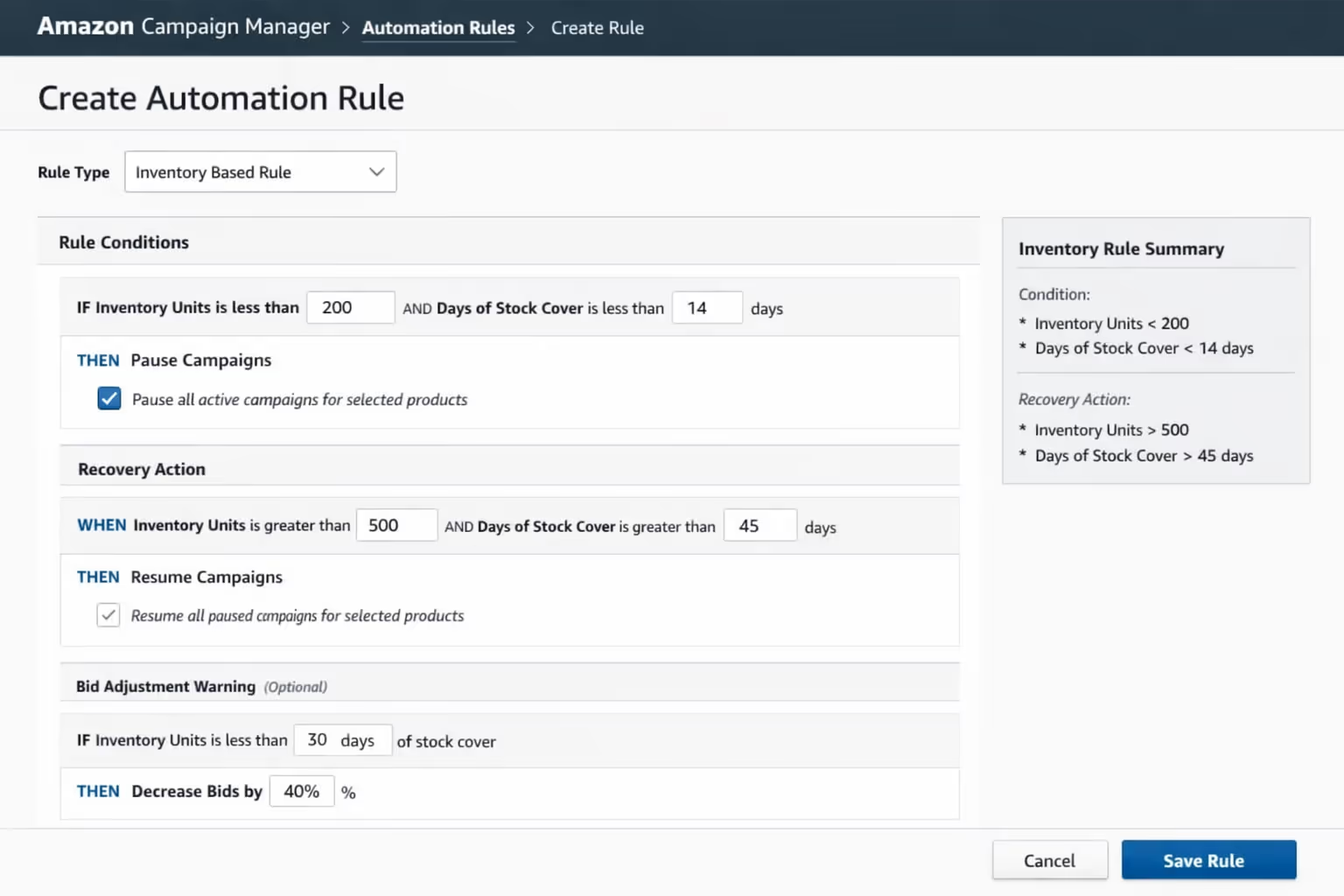
Tools like atom11, Perpetua, and Pacvue can pause campaigns based on inventory thresholds. Amazon's native Campaign Manager also offers basic automation through the Budgets and Rules feature (navigate to Campaign Manager → Budgets → Create Rule).
Here's how to set it up:
Rule 1: Low Stock Pause
IF inventory units < [your threshold] THEN pause product ads
Set threshold at 14-21 days of average sales
Rule 2: Auto-Unpause on Restock
IF inventory units > [recovery threshold] THEN resume product ads
Set recovery at 45-60 days of average sales
Rule 3: Bid Reduction Warning
IF inventory units < 30 days coverage THEN reduce bids by 40%
The automation removes human error. You set the rules once, and the system protects you while you focus on growth.
One client implemented these rules across 47 SKUs. In the first quarter, they eliminated $18,000 in wasted spend on low-stock products and avoided three stockouts that would have cost them significantly more in rank recovery.
Reorder Points: Using PPC Data to Prevent Inventory Surprises
Here's where PPC and inventory planning actually work together instead of against each other.
Your PPC campaigns generate the most accurate demand signal you have. When you launch a new campaign or scale an existing one, sales velocity changes. Your reorder calculations need to reflect that.
Basic Reorder Point Formula:
Reorder Point = (Lead Time in Days × Daily Sales) + Safety Stock
If your lead time is 15 days and you sell 10 units/day, your reorder point is 150 units plus safety stock.
But here's the mistake: most sellers use historical daily sales for this calculation.
The fix: Use campaign-adjusted velocity.
When you plan to scale PPC on a SKU, factor in the expected velocity increase. If your campaign typically lifts sales by 40%, adjust your reorder calculation accordingly.
Adjusted Reorder = (Lead Time × Historical Sales × 1.4) + Safety Stock
This prevents the classic disaster: you scale a campaign, it works beautifully, and then you stock out because your reorder point was based on pre-campaign velocity.
I've started building this into every Profit Feedback Loop engagement. PPC decisions and inventory decisions happen in the same conversation, not separate silos.
The Hidden Cost You're Not Calculating
Let's talk about organic rank for a second.
Organic sales typically drive 70%+ of total revenue for established products. PPC's job isn't just to generate direct sales—it's to build and protect the organic position that generates the majority of your profit.
When you stockout:
Your organic rank drops immediately
Competitors capture your abandoned keyword positions
Your sponsored placements disappear
Reviews slow down (no sales, no new reviews)
The "cost" of a stockout isn't just the missed sales during the outage. It's the 2-6 weeks of aggressive PPC required to climb back to your previous position.
I audited an account last year that stocked out on their #1 SKU for 18 days. Direct cost of missed sales: $23,000. Cost to rebuild organic rank: $41,000 in PPC over the following 6 weeks.
That's a $64,000 mistake that started with nobody watching inventory levels.
Building Your Inventory-PPC Sync System
Here's the exact workflow I recommend:
Weekly (Every Monday):
Review inventory coverage for all advertised SKUs
Flag anything below 45 days
Adjust bids or pause campaigns as needed (Auto/Broad first, then Exact)
Check for incoming shipments that change the picture
Monthly:
Analyze correlation between PPC scaling and velocity changes
Update reorder point calculations based on current campaign performance
Review automated rule thresholds—are they triggering appropriately?
Quarterly:
Audit total ad spend on SKUs that stocked out
Calculate rank recovery costs from any stockouts
Refine the 60-30 thresholds based on your specific lead times and margins
This isn't complicated. It's just intentional.
The sellers who build this system protect both their ad spend and their organic positions. The ones who don't keep paying the stockout tax over and over.
Your Next Move
Stop treating inventory and PPC as separate functions.
Start every campaign review by checking inventory coverage. Build automated rules to protect yourself when things get busy. Use your PPC data to forecast demand and set smarter reorder points.
The sellers who sync these two systems don't just save on wasted ad spend. They build sustainable, profitable brands that scale without the constant fire drills.
Ready to find the hidden profit leaks in your account? Book a free profit audit and let's look at your numbers together. We'll identify exactly where inventory-PPC misalignment is costing you money—and build a system to fix it.
Frequently Asked Questions
How do I calculate days of stock coverage for my products?
Divide your current inventory units by your average daily sales over the past 30 days. If you have 450 units and sell 15/day, you have 30 days of coverage. Update this calculation weekly, and factor in any planned PPC scaling that will increase velocity. Your advertising decisions should always reflect current inventory reality.
Should I completely pause ads when inventory gets low?
Below 14 days of coverage, yes—pause completely. Between 14-30 days, throttle strategically: pause Auto and Broad match campaigns first while keeping Exact match and Branded terms running longer. Complete pauses can hurt your campaign history and quality metrics, so prioritized throttling by match type often works better than blanket pauses.
What tools can automatically sync inventory and PPC?
Atom11, Perpetua, Pacvue, and similar platforms offer inventory-based automation rules. Amazon's native Campaign Manager also has basic rules (Campaign Manager → Budgets → Create Rule). The key is setting appropriate thresholds—typically 14-21 days of sales for pause triggers and 45-60 days for resume triggers.
How does stocking out affect my organic ranking?
Significantly. Amazon's algorithm interprets stockouts as seller unreliability. Your organic positions drop, competitors capture those keyword rankings, and recovery typically requires 2-4 weeks of aggressive (often unprofitable) PPC spend. Protecting inventory protects organic rank, which drives the majority of your long-term profit.
What's the best safety stock level for products I advertise heavily?
Add 25-35% buffer above your calculated reorder point for heavily advertised SKUs. PPC-driven velocity is less predictable than organic sales, and lead time delays happen. The cost of holding extra inventory is almost always lower than the cost of a stockout—especially for products with strong PPC-boosted organic positions.
About PPC Maestro
PPC Maestro specializes in profit-first Amazon advertising for 7-figure private-label brands. Founded by Bernard Nader, the agency has managed millions in ad spend using the Profit Feedback Loop methodology—a systematic approach to cutting wasted spend, reallocating budget to winners, and protecting contribution margin. Every recommendation is backed by real audit data and proven results from brands scaling profitably on Amazon. Explore verified client outcomes and downloadable SOPs on the PPC Maestro website.